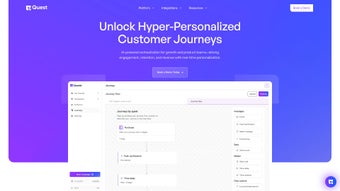

Download QuestLabs – AI Design Tool, Secure Subscription, Free Trial
Overview of QuestLabs
QuestLabs is a modern, subscription‑based web application that sits at the intersection of artificial intelligence and design. Launched on Softonic on May 24th 2025, the platform promises to streamline the creative workflow for designers, marketers, and developers who need rapid visual mock‑ups powered by AI. Unlike traditional design suites that require hefty installations, frequent patch cycles, and powerful local hardware, QuestLabs runs entirely in the browser, making it instantly accessible from any device with an internet connection.
Its AI engine can generate layout suggestions, color palettes, typography pairings, and even complete branding concepts with just a few keywords. Users appreciate the blend of flexibility and automation, which reduces the time spent on repetitive design tasks while preserving creative control. The subscription model includes regular feature updates, cloud‑based asset storage, and priority support, ensuring that the tool evolves alongside industry trends.
Security and data privacy are baked into the architecture: all data in transit is encrypted with TLS 1.3, and assets at rest are protected with AES‑256 encryption. Whether you are a freelance designer looking for a quick prototype solution or a larger team seeking collaborative AI‑driven design, QuestLabs aims to deliver a secure, scalable, and intuitive experience that works across Windows, macOS, Linux, iOS, and Android browsers. Early documentation highlights a focus on cross‑browser compatibility, real‑time collaboration, and a modular feature set that can expand without disrupting existing workflows, positioning QuestLabs as a future‑proof choice for creative professionals.
Key Features That Set QuestLabs Apart
- AI‑Generated Design Concepts: Input a brief description and let the AI propose multiple layout options, complete with imagery, typography, and color schemes.
- Real‑Time Collaboration: Multiple users can edit the same project simultaneously, with changes reflected instantly across browsers.
- Smart Asset Library: Integrated cloud storage for icons, vectors, and stock photos, automatically tagged by AI for easy retrieval.
- Responsive Preview Mode: Instantly view how designs adapt to desktop, tablet, and mobile screen sizes without leaving the app.
- Version History & Rollback: Every change is saved, allowing you to revert to previous versions or compare design iterations.
- Export Options: Export designs as PNG, SVG, PDF, or directly to popular prototyping tools like Figma and Adobe XD.
- Secure Subscription Management: Transparent billing, auto‑renewal controls, and the ability to pause or cancel the subscription at any time.
- Regular AI Model Updates: The underlying AI engine receives monthly improvements, ensuring the latest design trends are incorporated.
- Customizable Toolbar & Keyboard Shortcuts: Tailor the interface to your workflow and speed up repetitive tasks.
- Analytics Dashboard: Teams can monitor usage, asset consumption, and collaborative activity from an admin console.
These features are tightly integrated into a sleek, browser‑based interface that works across all major platforms. QuestLabs also offers a 14‑day free trial, allowing prospective users to explore the AI capabilities before committing to a paid plan. The platform’s modular design means new features can be added without disrupting existing workflows, making it a future‑proof choice for design teams that value both innovation and stability. Because everything runs in the cloud, there is no need to manage licences per workstation, and updates are applied automatically the moment the next AI model is released. This eliminates the traditional “version‑lock” problem that plagues many desktop‑only design tools, ensuring that every user always works with the most current set of design assets and algorithmic improvements.
Installation, Usage Guide, and Compatibility
Getting Started in Minutes
Since QuestLabs is a web application, there is no traditional installation process. To begin, visit the official QuestLabs website and click the “Start Free Trial” button. You will be prompted to create an account using an email address or a single‑sign‑on option such as Google or Microsoft.
After confirming your email, you can immediately access the dashboard where new projects can be created with a single click. The onboarding wizard walks you through setting up your first AI‑driven design brief, selecting preferred output formats, and inviting team members if you are on a collaborative plan. For organizations, an admin can provision users via SAML‑based SSO, ensuring that corporate security policies are respected from day one.
Browser Support and System Requirements
QuestLabs is built with modern web standards and is fully compatible with the latest versions of Chrome, Firefox, Safari, Edge, and Opera. Because it relies on HTML5, WebGL, and WebAssembly for AI processing, a stable internet connection (minimum 5 Mbps) and a relatively recent GPU are recommended for optimal performance. The application is also responsive, meaning it works on tablets and smartphones running iOS or Android, though the full feature set is best experienced on a desktop or laptop with a 1080p screen or higher. No additional plugins or extensions are required, and the service works equally well on Windows 10/11, macOS 12+, and most Linux distributions that support a modern browser.
Efficient Workflow Tips
Once logged in, the workflow typically follows these steps: (1) Create a new project and input a brief description; (2) Choose the AI style preset (e.g., minimalist, corporate, playful); (3) Review the generated concepts and refine by adjusting parameters such as color temperature, typography weight, or image style; (4) Share the design with collaborators or export it for downstream development. QuestLabs also provides keyboard shortcuts (e.g., Ctrl + S to save, Ctrl + Z to undo) and a customizable toolbar that lets power users pin their most‑used actions. For teams, the admin console offers usage analytics, permission controls, and billing management, ensuring that the subscription aligns with actual usage and that sensitive assets remain protected behind role‑based access controls.
Pros & Cons, Frequently Asked Questions, and Final Verdict
Pros
- AI‑driven design reduces time‑to‑prototype dramatically.
- Fully browser‑based; no heavy installations or manual updates.
- Cross‑browser compatibility (Chrome, Firefox, Safari, Edge, Opera).
- Robust real‑time collaboration tools for distributed teams.
- Secure subscription model with transparent billing and easy cancellation.
- Monthly AI model updates keep designs on‑trend.
- Comprehensive analytics dashboard for administrators.
- Extensive export options, including direct integration with Figma and Adobe XD.
Cons
- Reliance on an internet connection; offline work is not supported.
- AI suggestions may require manual tweaking for brand‑specific nuances.
- Subscription cost could be a barrier for solo freelancers on a tight budget.
- Limited native export formats compared to some heavyweight desktop suites.
- Feature set is still expanding; early adopters may encounter occasional bugs.
- Performance on low‑end devices may be slower due to WebGL processing.
Frequently Asked Questions
Is there a free version of QuestLabs?
QuestLabs offers a 14‑day free trial that provides full access to all premium features. After the trial, you must choose a paid subscription to continue using the platform.
Can I export designs to Adobe Creative Cloud?
While QuestLabs does not integrate directly with Adobe CC, you can export designs as high‑resolution PNG, SVG, or PDF files and then import them into Photoshop, Illustrator, or InDesign for further refinement.
What security measures protect my design data?
QuestLabs uses end‑to‑end encryption (TLS 1.3) for data in transit and AES‑256 encryption for data at rest. All user credentials are stored using salted bcrypt hashing, and regular third‑party security audits are performed.
Does QuestLabs work on mobile browsers?
Yes, the interface is responsive and can be accessed on iOS and Android browsers, though the full suite of AI generation tools works best on desktop browsers with a larger screen.
How often are AI models updated?
QuestLabs releases AI model updates on a monthly basis, incorporating the latest design trends, color theory research, and performance optimizations.
Conclusion – Should You Download QuestLabs?
QuestLabs positions itself as a forward‑thinking solution for designers who want to harness AI without the overhead of traditional software installations. Its browser‑centric architecture, cross‑platform compatibility, and strong collaboration features make it a compelling choice for teams that value speed and flexibility. While the reliance on an internet connection and a subscription fee may be drawbacks for some, the time saved in the design ideation phase often justifies the cost.
If you are looking for a secure, regularly updated AI design assistant that works across Chrome, Firefox, Safari, Edge, and Opera, giving you the ability to generate and refine concepts in minutes, QuestLabs is worth the download and a trial run. Sign up today, explore the free trial, and see how AI can transform your creative workflow. Start your free trial now and experience a faster, smarter way to design.



.png)



